
User Guide





Garmin G1000 Pilot’s Guide for the Cessna Citation Mustang
190-00494-00 Rev. B 8-1
ADDITIONAL FEATURES
SECTION 8 ADDITIONAL FEATURES
NOTE: The availability of SafeTaxi, ChartView, or FliteCharts in electronic form does not preclude the
requirement to carry paper charts aboard the aircraft. See AC 120-76A for more information.
Additional features of G1000 include SafeTaxi™ diagrams, ChartView and FliteCharts™ electronic charts, and
XM Radio entertainment for the passengers.
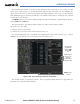
SafeTaxi diagrams provide detailed taxiway, runway, and ramp information at more than 650 airports in the
United States. By zooming in on an airport that has a SafeTaxi diagram available, a close up view of the airport
layout can be seen in detail.
The optional ChartView and FliteCharts provide on-board electronic terminal procedures charts. Electronic
charts offer the convenience of rapid access to essential information. Either ChartView or FliteCharts may be
configured in the system, but not both.
The optional XM Radio entertainment feature of the GDL 69A Data Link Receiver offers commercial-free
listening to entertainment audio. XM Radio offers more entertainment choices and longer range coverage than
commercial broadcast stations.
8.1 SAFETAXI
SafeTaxi is an enhanced feature that gives greater map detail when zooming in on airports at close range. The
maximum map ranges for enhanced detail are configurable by the flight crew. When zoomed in close enough to
show the airport detail, the map reveals runways with numbers, taxiways with identifying letters/numbers, and
airport landmarks including ramps, buildings, control towers, and other prominent features. Resolution is greater
at lower map ranges. When the aircraft location is within the screen boundary, including within SafeTaxi ranges,
an airplane symbol is shown on any of the navigation map views for enhanced position awareness.