
User Guide





190-00494-00 Rev. B
Garmin G1000 Pilot’s Guide for the Cessna Citation Mustang
7-39
AFCS
Vertical Path Tracking descent to VNV Target Altitude:
1) Select VNV flight control:
a) Press the
VNV
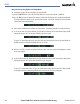
Key to arm Vertical Path Tracking Mode. The white annunciation ‘VPTH’ appears.
b) Using the ALT SEL Knob, set the Selected Altitude at least 75 feet below the VNV Target Altitude of 10,000
feet.
c) If Vertical Path Tracking Mode is armed more than 5 minutes prior to descent path capture, acknowledgment is
required for the flight director to transition from Altitude Hold to Vertical Path Tracking Mode. To proceed with
descent path capture if the white ‘VPTH’ annunciation begins flashing, do one of the following
• Press the VNV Key • Turn the ALT Knob to adjust the Selected Altitude
If the descent is not confirmed by the time of interception, Vertical Path Tracking Mode remains armed and the
descent is not captured.
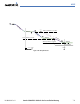
2) When the top of descent (TOD) is reached, the flight director transitions to Vertical Path Tracking Mode and
begins the descent to the VNV Target Altitude. Intention to capture the VNV Target Altitude is indicated by the
white ‘ALTV’ annunciation.
3) As the aircraft nears the VNV Target Altitude, the flight director transitions to VNV Target Altitude Capture Mode,
indicated by the green ‘ALTV’ annunciation flashing for up to 10 seconds.
The green ‘ALT’ annunciation flashes for up to 10 seconds upon reaching 50 feet from the VNV Target Altitude;
the autopilot transitions to Altitude Hold Mode and levels the aircraft at the vertical waypoint.
Figure 7-40 VPTH Descent
3 nm