
User Guide





190-00494-00 Rev. B
Garmin G1000 Pilot’s Guide for the Cessna Citation Mustang
7-29
AFCS
BACKCOURSE MODE (BC)
NOTE: When making a backcourse approach, set the Selected Course to the localizer front course.
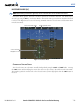
Backcourse Mode captures and tracks a localizer signal in the backcourse direction. The mode may be
selected by pressing the BC Key. Backcourse Mode is armed if the CDI is greater than one dot when the mode
is selected. The flight director creates roll steering commands from the Selected Course and deviation when
in Backcourse Mode.
Glideslope Mode Active
Backcourse Mode Active
LOC2 is Selected
Navigation Source
Figure 7-29 Backcourse Mode
CHANGING THE SELECTED COURSE
The Selected Course on each PFD is controlled independently using the CRS1 and CRS2 knobs. Pressing
the CWS Button and hand-flying the aircraft does not reset any reference data while in Backcourse Mode.
The autopilot guides the aircraft back to the Selected Course (or GPS flight plan) when the CWS Button is
released.