
User Guide





190-00494-00 Rev. B
Garmin G1000 Pilot’s Guide for the Cessna Citation Mustang
7-25
AFCS
NAVIGATION MODE (GPS, VOR, LOC)
NOTE: The selected navigation receiver must have a valid VOR or LOC signal or active GPS course for the
flight director to enter Navigation Mode.
Pressing the NAV Key selects Navigation Mode. Navigation Mode acquires and tracks the selected navigation
source (GPS, VOR, LOC). The flight director follows GPS roll steering commands when GPS is the selected
navigation source. When the navigation source is VOR or LOC, the flight director creates roll steering
commands from the Selected Course and deviation. Navigation Mode can also be used to fly non-precision
GPS and LOC approaches where vertical guidance is not required.
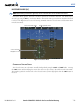
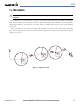
If the Course Deviation Indicator (CDI) shows greater than one dot when the NAV Key is pressed, the
selected mode is armed. The armed annunciation appears in white to the left of the active lateral mode. For
cases where the projected course is offset a large distance from the present course for turn anticipation, GPS
Navigation Mode can be activated with crosstrack error up to 10 nm.
Figure 7-26 GPS Navigation Mode Armed
When the CDI has automatically switched from GPS to LOC during a LOC/ILS approach, GPS Navigation
Mode remains active, providing GPS steering guidance until the localizer signal is captured. LOC Navigation
Mode is armed automatically when the navigation source switch takes place if the APR Key is not pressed
prior to the automatic source switch.
If Navigation Mode is active and either of the following occur, the flight director reverts to Roll Hold Mode
(wings rolled level):
• Different VOR tuned while in VOR Navigation Mode (VOR Navigation Mode reverts to armed)
• Navigation source manually switched (with the
CDI Softkey)
• FAF crossed while in GPS Navigation Mode after the automatic navigation source switch from GPS to
LOC