
User Guide



Garmin G1000 Pilot’s Guide for the Cessna Citation Mustang
190-00494-00 Rev. B
7-24
AFCS
HEADING SELECT MODE (HDG)
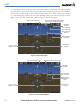
Heading Select Mode is activated by pressing the HDG Key. Heading Select Mode acquires and maintains
the Selected Heading. The Selected Heading is shown by a light blue bug on the HSI and in the box to the
upper left of the HSI.
CHANGING THE SELECTED HEADING
NOTE: Pressing the HDG Knob synchronizes the Selected Heading to the current heading.
The Selected Heading is adjusted using the HDG Knob on either PFD. Pressing the CWS Button and
hand-flying the aircraft does not change the Selected Heading. The autopilot guides the aircraft back to the
Selected Heading upon release of the CWS Button.
Turns are commanded in the same direction as Selected Heading Bug movement, even if the bug is turned
more than 180° from the present heading (e.g., a 270° turn to the right). However, Selected Heading
changes of more than 340° at a time result in turn reversals.
Figure 7-25 Heading Select Mode
Pitch Hold Mode Active
Command Bars
Track Selected
Heading
Heading Select Mode Active
Selected
Heading
Selected
Heading
Bug