
User Guide



190-00494-00 Rev. B
Garmin G1000 Pilot’s Guide for the Cessna Citation Mustang
7-19
AFCS
GLIDEPATH MODE (GP)
NOTE: Pressing the CWS Button while Glidepath Mode is active does not cancel the mode. The autopilot
guides the aircraft back to the glidepath upon release of the CWS Button.
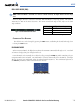
Glidepath Mode is used to track the WAAS-based glidepath. When Glidepath Mode is armed, ‘GP’ is
annunciated in white in the AFCS Status Box.
Selecting Glidepath Mode:
1) Ensure a GPS approach is loaded into the active flight plan. The active waypoint must be part of the flight plan
(cannot be a direct-to a waypoint not in the flight plan).
2) Ensure that GPS is the selected navigation source (use the CDI Softkey to cycle through navigation sources if
necessary).
3) Press the APR Key.
Upon reaching the glidepath, the flight director transitions to Glidepath Mode and begins to capture and
track the glidepath.
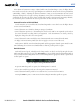
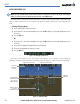
Figure 7-18 Glidepath Mode Armed
Once the following conditions have been met, the glidepath can be captured:
• The active waypoint is at or after the final approach fix (FAF).
• Vertical deviation is valid.
• The CDI is at less than full scale deviation
• Automatic sequencing of waypoints has not been suspended (no ‘SUSP’ annunciation on the HSI)
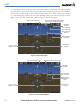
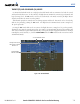
Figure 7-19 Glidepath Mode
Glidepath Mode Active
Command Bars
Indicate Descent
on Glidepath
GPS Approach Mode Active
Glidepath
Indicator
GPS is Selected
Navigation Source
LPV
Approach
Active