
User Guide



Garmin G1000 Pilot’s Guide for the Cessna Citation Mustang
190-00494-00 Rev. B
7-18
AFCS
VNV TARGET ALTITUDE CAPTURE MODE (ALTV)
NOTE: Armed VNV Target Altitude and Selected Altitude capture modes are mutually exclusive. However,
Selected Altitude Capture Mode is armed implicitly (not annunciated) whenever VNV Target Altitude Capture
Mode is armed.
VNV Target Altitude Capture is analogous to Selected Altitude Capture Mode and is armed automatically
after the VNV Key is pressed and the next VNV Target Altitude is to be intercepted before the Selected
Altitude. The annunciation ‘ALTV’ indicates that the VNV Target Altitude is to be captured. VNV Target
Altitudes are shown in the active flight plan or vertical direct-to, and can be entered manually or loaded
from a database (see the GPS Navigation Section for details). At the same time as “TOD within 1 minute”
is annunciated in the Navigation Status Box, the active VNV Target Altitude is displayed above the Vertical
Speed Indicator (see Figure 7-14).
As the aircraft nears the VNV Target Altitude, the flight director automatically transitions to VNV Target
Altitude Capture Mode with Altitude Hold Mode armed. This automatic transition is indicated by the green
‘ALTV’ annunciation flashing for up to 10 seconds and the appearance of the white ‘ALT” annunciation.
The VNV Target Altitude is shown as the Altitude Reference beside the ‘ALTV’ annunciation and remains
displayed above the Vertical Speed Indicator. The Required Vertical Speed Indication (RSVI) is removed
once VNV Target Altitude Capture Mode becomes active.
At 50 feet from the VNV Target Altitude, the flight director automatically transitions from VNV Target
Altitude Capture to Altitude Hold Mode and tracks the level leg. As Altitude Hold Mode becomes active,
the white ‘ALT’ annunciation moves to the active vertical mode field and flashes green for 10 seconds to
indicate the automatic transition. The flight director automatically arms Vertical Path Tracking, allowing
upcoming descent legs to be captured and subsequently tracked.
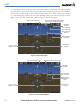
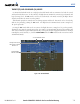
Flash up to 10 sec, Indicating Automatic Transition
Altitude Reference (In
This Case, Equal To
VNV Altitude Target)
Figure 7-17 VNV Altitude Capture
Changing the VNV Target Altitude
NOTE: Pressing the CWS Button while in VNV Target Altitude Capture Mode does not cancel the mode.
Changing the current VNV Target Altitude while VNV Target Altitude Capture Mode is active causes
the flight director to revert to Pitch Hold Mode. Vertical Path Tracking and the appropriate altitude
capture mode are armed in preparation to capture the new VNV Target Altitude or the Selected Altitude,
depending on which altitude is to be intercepted first.
VNV target altitudes can be changed while editing the active flight plan (see the GPS Navigation Section
for details).