
User Guide



190-00494-00 Rev. B
Garmin G1000 Pilot’s Guide for the Cessna Citation Mustang
7-15
AFCS
VERTICAL PATH TRACKING MODE (VPTH)
NOTE: If another vertical mode key is pressed while Vertical Path Tracking Mode is selected, Vertical Path
Tracking Mode reverts to armed.
NOTE: Pressing the CWS Button while Vertical Path Tracking Mode is active does not cancel the mode. The
autopilot guides the aircraft back to the descent path upon release of the CWS Button.
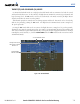
When a vertical profile (VNV flight plan) is active and the VNV Key is pressed, Vertical Path Tracking
Mode is armed in preparation for descent path capture. ‘VPTH’ (or ‘/V’ when Glidepath or Glideslope
Mode is concurrently armed) is annunciated in white in addition to previously armed modes. If applicable,
the appropriate altitude capture mode is armed for capture of the next VNV Target Altitude (ALTV) or the
Selected Altitude (ALTS), whichever is greater.
Figure 7-13 Vertical Path Tracking Armed Annunciations
Prior to descent path interception, the Selected Altitude must be set below the current aircraft altitude
by at least 75 feet. For the flight director to transition from Altitude Hold to Vertical Path Tracking Mode,
acknowledgment is required within five minutes of descent path interception by:
• Pressing the VNV Key
• Adjusting the Selected Altitude
If acknowledgment is not received within one minute of descent path interception, the white ‘VPTH’
annunciation and the
VNV Key annunciator light start to flash. Flashing continues until acknowledged or
the descent path is intercepted. If the descent is not confirmed by the time of interception, Vertical Path
Tracking Mode remains armed and the descent is not captured.