
User Guide






190-00494-00 Rev. B
Garmin G1000 Pilot’s Guide for the Cessna Citation Mustang
7-13
AFCS
CHANGING THE AIRSPEED REFERENCE
The Airspeed Reference (shown in both the AFCS Status Box and above the Airspeed Indicator) may be
adjusted by:
• Using the
NOSE UP/DN
Wheel
• Pressing the
CWS
Button, hand-flying the aircraft to attain a new Airspeed Reference, then releasing the
CWS
Button
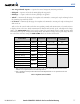
During climb, the Airspeed Reference units automatically change from IAS to Mach when either the
altitude or the airspeed listed in Table 7-2 are attained. For descent, the units switch back at the specified
altitude or airspeed. The system determines aircraft climb or descent by the relationship between the
current and Selected altitudes.
Airspeed Reference Units Unit Type Changes At:
Default Units Change To: Altitude Airspeed
Climb IAS Mach > 31,500 ft > M 0.48
Descent Mach IAS < 27,000 ft < 249 kt
Table 7-2 FLC Mode Unit Changes
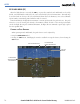
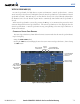
Airspeed Reference units can be manually toggled between IAS and Mach units using the SPD Key. When
the FLC Airspeed Reference is displayed in Mach, the Airspeed Reference Bug is displayed on the Airspeed
Indicator at the IAS corresponding to the selected Mach target speed and the current Mach number is
shown below the Airspeed Indicator.
Figure 7-12 Flight Level Change Mode (Mach)
Selected Altitude
Capture Mode Armed
Flight Level Change
Mode Active
Airspeed
Reference
Airspeed
Reference
Bug
Airspeed
Reference
(Mach)
Current
Mach
Number