
User Guide






Garmin G1000 Pilot’s Guide for the Cessna Citation Mustang
190-00494-00 Rev. B
7-4
AFCS
7.2 FLIGHT DIRECTOR OPERATION
The flight director function provides pitch and roll commands to the AFCS and displays them on the PFDs.
With the flight director active, the aircraft can be hand-flown to follow the path shown by the Command Bars.
Maximum commanded pitch (±20°) and roll (Table 7-3) angles, vertical acceleration, and roll rate are limited to
values established during AFCS certification. The flight director also provides commands to the autopilot.
ACTIVATION
Pressing the
FD
or
AP
Key or the CWS Button (when the flight director is not active) activates the pilot-side
flight director in default vertical/lateral modes (Pitch and Roll Hold modes). Pushing the
GA Switch
or any
flight director mode key activates the pilot-side flight director in the respective mode(s). The flight director may
be turned off by pressing the
FD
Key. The FD Key is disabled when the autopilot is engaged.
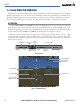
Flight director mode annunciations are displayed on the PFDs when the flight director is active. Flight
director selection and autopilot and yaw damper statuses are shown in the center of the AFCS Status Box.
Lateral flight director modes are displayed on the left and vertical on the right. Armed modes are displayed in
white and active in green.
Selected Altitude
Command Bars
Figure 7-2 PFD AFCS Display
Yaw
Damper
Status
Flight Director
Indicator Arrow
AFCS Status Box
Lateral Modes
Active
Autopilot
Status
Active
Vertical Modes
ArmedMode
Reference
Armed
Vertical Speed
Reference
Selected Course Selected Heading
GPS is Selected
Navigation Source