
User Guide






Garmin G1000 Pilot’s Guide for Cessna Citation Mustang
190-00494-00 Rev. B6-68
HAZARD AVOIDANCE
TRAFFIC MAP PAGE
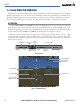
The Traffic Map Page is in the Map Group and displays the following information:
• Current aircraft location
• Surrounding TIS traffic
• Range Marking Rings - The range at which traffic is being displayed on the Traffic Map Page
• Current Traffic Mode - Indicates if TIS is in Standby or Operate mode
• Traffic Alert Message - Displays in yellow in the center of the Traffic Map Page
• Traffic Status Banner - Displays in the lower left corner of the Traffic Map Page
Displaying traffic on the Traffic Map Page:
1) Select the Map Page Group.
2) Select the Traffic Map Page.
3) Turn the
Joystick
clockwise to display a larger area or counter-clockwise to display a smaller area. Map ranges
are 2 nm, 6 nm, and 12 nm.
Surrounding
Traffic
Surrounding Traffic
Traffic Display Banner
of All Possible System
Statuses
Surrounding Traffic
Current Traffic
Mode
Figure 6-70 Traffic Map Page - General Information
Range
Marking
Rings