
User Guide






190-00494-00 Rev. B
Garmin G1000 Pilot’s Guide for Cessna Citation Mustang
6-65
HAZARD AVOIDANCE
The altitude difference between the client aircraft and other intruder aircraft is displayed either above or below
the traffic symbol in hundreds of feet. If the other aircraft is above the client aircraft, the altitude data displays
above the traffic symbol. If the other aircraft is below the client aircraft, the altitude data displays below the traffic
symbol.
Altitude trend is displayed as an up or down arrow (±500 fpm in either direction) to the right of the target
symbol. If the altitude trend is less than 500 fpm in either direction, no arrow displays. TIS also provides a vector
line showing the direction in which the traffic is moving, to the nearest 45°.
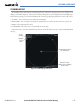
Figure 6-67 Traffic Map Page - Advisories
Non-Threat
Traffic
Non-Threat
Traffic
Proximity Advisory, Aircraft
is 1700’ Above and
Descending
Traffic Advisory,
Offscale, Aircraft is Out
of Range
Traffic Advisory,
Aircraft is 400’ Below
and Climbing
“Non-Bearing” Traffic (System is Unable
to Determine Bearing), Aircraft Distance
is 8.0 nm, 1100’ Above and Descending
Operating
Mode
Traffic information can be displayed on the following pages:
• PFD Inset Map
• Navigation Map
• Traffic Map Page
• WPT - VOR Information Page
• AUX - Trip Planning Page
• Nearest Pages
• FPL - Active Flight Plan Page
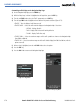
To display traffic on any page other than the Traffic Map Page:
1) Press the MAP Softkey (INSET Softkey for the PFD Inset Map).
2) Press the TRAFFIC Softkey.