
User Guide





190-00494-00 Rev. B
Garmin G1000 Pilot’s Guide for the Cessna Citation Mustang
1-24
SYSTEM OVERVIEW
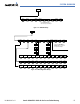
Figure 1-20 XPDR Softkeys
Press the BACK Softkey to return
to the top-level softkeys.
Press the IDENT or BACK Softkey to return
to the top-level softkeys.
MSG
MSG
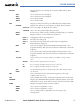
MFD SOFTKEYS
CAS ↑
Scroll up (enabled only when a sufficient number of items are displayed
in the Crew Alerting System Display to warrant scrolling)
CAS ↓
Scroll down (enabled only when a sufficient number of items are
displayed in the Crew Alerting System Display to warrant scrolling)
MAP
Enables second-level Navigation Map softkeys
TRAFFIC
Displays traffic information on Navigation Map
TOPO
Displays topographical data (e.g., coastlines, terrain, rivers, lakes) and
elevation scale on Navigation Map
TERRAIN
Displays terrain information on Navigation Map
AIRWAYS
(Default label
is dependant
on map setup
option selected)
Displays airways on the map; cycles through the following:
AIRWAYS: No airways are displayed
AIRWY ON: All airways are displayed
AIRWY LO: Only low altitude airways are displayed
AIRWY HI: Only high altitude airways are displayed
NEXRAD
Displays NEXRAD weather and coverage information on Navigation
Map (optional feature)
XM LTNG
Displays XM lightning information on Navigation Map (optional feature)
BACK
Returns to top-level softkeys
DCLTR (3)
Selects desired amount of map detail; cycles through declutter levels:
DCLTR (No Declutter): All map features visible
DCLTR-1: Declutters land data
DCLTR-2: Declutters land and SUA data
DCLTR-3: Removes everything except for the active flight plan
SHW CHRT
When available, displays optional airport and terminal procedure charts
CHKLIST
When available, displays optional checklists