
User Guide




190-00494-00 Rev. B
Garmin G1000 Pilot’s Guide for Cessna Citation Mustang
6-43
HAZARD AVOIDANCE
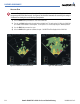
Adjusting antenna tilt on the Vertical Scan display:
1) Select the
TILT Softkey to activate the cursor in the TILT field and display the Tilt Line as seen in Figure 6-47.
If the Tilt Line is not displayed, press the MENU Key and turn the large
FMS Knob to select ‘Show Tilt Line’.
Press the ENT Key.
2) Turn the small
FMS Knob to adjust the antenna tilt angle. The selected tilt angle will be implemented when
Horizontal Scan is again selected.
The Joystick can also be used to adjust tilt.
Figure 6-47 Adjusting Tilt on Vertical Scan Display
Scan Line
Tilt Line