
User Guide




Garmin G1000 Pilot’s Guide for Cessna Citation Mustang
190-00494-00 Rev. B6-28
HAZARD AVOIDANCE
SETTING UP XM WX SATELLITE WEATHER
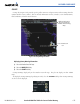
Use the Map Setup Window (Figure 6-33) to customize the display of weather data on the Navigation Map
and other G1000 maps. The Map Setup Window settings control the display of weather data on all G1000
pages, except the Weather Data Link Page.
Figure 6-33 Map Setup Options
Setting up and customizing weather data:
1) On the Navigation Map Page, press the MENU Key.
2) While the ‘Map Setup’ selection is highlighted, press the ENT Key.
3) Turn the small FMS Knob to select the Weather Group and press the ENT Key.
4) Turn the large FMS Knob to highlight and move between the product selections.
5) When an item is highlighted, turn the small FMS Knob to select the desired option.
6) Press the ENT Key.
The following options are available (Figure 6-33):
• NEXRAD DATA – Turns the display of NEXRAD data and radar coverage on/off and selects the maximum
display range.
• XM LTNG – Turns the display of XM Lightning on/off. Selects the maximum display range.
•
CELL MOVEMENT
– Turns the display of storm cell movement on/off. Cell Movement is shown only when
NEXRAD is turned on.