
User Guide




190-00494-00 Rev. B
Garmin G1000 Pilot’s Guide for Cessna Citation Mustang
6-27
HAZARD AVOIDANCE
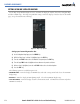
Figure 6-32 shows the Data Link Setup Window. The ‘ON’ and ‘OFF’ settings control the display of weather
products the same way that softkeys do.
The selected range settings on the Data Link Setup Window control the largest map range at which each
weather product displays on the Weather Data Link Page. If a map range larger than the weather product range
setting is selected, the weather product data declutters from the map.
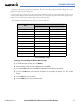
The maximum and minimum range settings are listed in Table 6-3.
Data
Range Options (in nm unless otherwise indicated)
Minimum Maximum
NEXRAD Data 10 2000
Echo Top Data 10 2000
Cloud Top Data 10 2000
LTNG Data
10 2000
CELL MOV Data 10 2000
SIG/AIR 10 2000
METAR Data
1 ft 5000 ft
SFC Data 10 2000
FRZ LVL Data 10 2000
COUNTY Data 10 2000
CYCLONE Data 10 2000
Table 6-3 Map Range Settings
Setting up and customizing the Weather Data Link Page:
1) On the Weather Data Link Page, press the
MENU
Key.
2) While the Weather Setup selection is highlighted, press the
ENT
Key.
3) Turn the large
FMS
Knob or press the
ENT
Key to highlight and move between the products.
4) Turn the small
FMS
Knob to move between the options for each product (for example, ‘Yes’, ‘No’, or Map
Range).
5) Press the
ENT
Key to select an option.
6) Press the
MENU
Key to restore the default settings.