
User Guide






190-00494-00 Rev. B
Garmin G1000 Pilot’s Guide for Cessna Citation Mustang
6-19
HAZARD AVOIDANCE
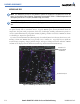
Displaying METAR and TAF text:
1) On the Weather Data Link Page, press the METAR Softkey. METAR flags display.
2) Press the Joystick and pan to the desired airport.
3) Press the ENT Key. The Weather Information Page displays with METAR and TAF text.
4) Use the FMS Knob or the ENT Key to scroll through the METAR and TAF text. Note that the METAR text must
be completely scrolled through before scrolling through the TAF text.
5) Press the FMS Knob or the CLR Key to return to the Weather Data Link Page.
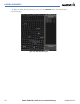
Figure 6-20 METAR and TAF Text on the WPT - Weather Information Page
METAR
Flag
METAR
Text
TAF Text
OR:
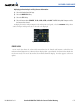
1) Select the Weather Information Page.
a) Select the Waypoint Page Group.
b) Select the first rectangular page icon.
c) Select the WX Softkey to select the Weather Information Page.
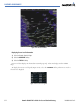
2) Press the FMS Knob to display the cursor.
3) Use the FMS Knob to enter the desired airport and press the
ENT
Key.
4) Use the FMS Knob or the ENT Key to scroll through the METAR and TAF text. Note that the METAR text must
be completely scrolled through before scrolling through the TAF text.