
User Guide






190-00494-00 Rev. B
Garmin G1000 Pilot’s Guide for Cessna Citation Mustang
6-15
HAZARD AVOIDANCE
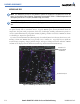
Figure 6-14 Cell Movement Data
Storm Cells
Select the CELL MOV Softkey to show the storm cells on the Weather Data Link Page. Using the Navigation
Map Setup Window, Cell Movement data displays on the following maps. See “Seting Up XM WX Satellite
Weather on the Navigation Map” for more information.
• PFD Inset Map • AUX - Trip Planning Page
•Navigation Map • Nearest Pages
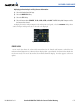
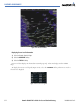
Displaying Cell Movement information:
1) Select the MAP Softkey. For the PFD Inset Map, select the INSET Softkey. This is not necessary for the Weather
Data Link Page.
2) Select the NEXRAD Softkey, or the CEL MOV Softkey for the Weather Data Link Page.
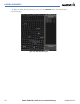
To display the Cell Movement legend on the Weather Data Link Page, (Figure 6-15), select the
LEGEND
Softkey when Cell Movement is selected for display.
Figure 6-15 Cell Movement Legend