
User Guide



Garmin G1000 Pilot’s Guide for Cessna Citation Mustang
190-00494-00 Rev. B6-2
HAZARD AVOIDANCE
These IDs are located:
• On the label on the back of the Data Link Receiver
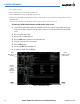
• On the XM Information Page on the MFD (Figure 6-1)
• On the XM Satellite Radio Activation Instructions included with the unit (available at www.garmin.com, P/N
190-00355-04)
Contact the installer if the Data Radio ID and the Audio Radio ID cannot be located.
Activating the XM WX Satellite Weather and XM Satellite Radio services:
1) Contact XM WX Satellite Radio through the email address listed on their website (www.xmradio.com) or by the
customer service phone number listed on the website. Follow the instructions provided by XM Satellite Radio
services.
2) Select the Auxiliary Page Group.
3) Select the fifth rectangular page icon.
4) Select the INFO Softkey to display the XM Information Page.
5) Verify that the desired services are activated.
6) Select the LOCK Softkey.
7) Turn the large FMS Knob to highlight ‘YES’.
8) To complete activation, press the ENT Key.
Figure 6-1 XM Information Page
Audio
Radio ID (for XM
Satellite Radio)
LOCK
Softkey
Weather
Products
(available
products
indicated in
green)
Data
Radio ID (for XM
Weather)
INFO
Softkey