
User Guide



GPS NAVIGATION
5-150 190-00494-00 Rev. B
Garmin G1000 Pilot’s Guide for the Cessna Citation Mustang
10) With ‘LOAD?’ highlighted, select the
ENT
Key to load the approach OR: to activate the approach, highlight
‘ACTIVATE?’. NOTE:
If the approach is not approved for GPS, a ‘NOT APPROVED FOR GPS’ message is displayed
with ‘YES’ highlighted. Select the
ENT
Key to acknowledge the message. To cancel the approach, select ‘NO’
and select the
ENT
Key.
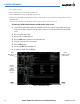
ACTIVATE APPROACH
‘ACTIVATE APPROACH’ activates the approach.
Figure 5-143 Activate Approach Selection
Activating the approach for a direct-to or flight plan destination airport:
1) From the active flight plan window, select the PROC Key to display the Procedures Window.
2) Highlight ‘ACTIVATE APPROACH’.
3) Select the ENT Key.