
User Guide



GPS NAVIGATION
5-148 190-00494-00 Rev. B
Garmin G1000 Pilot’s Guide for the Cessna Citation Mustang
Selecting a departure for the departure airport:
1) Display the Procedures Window by pressing the
PROC
Key.
2) Highlight ‘SELECT DEPARTURE’.
3) Select the
ENT
Key.
4) Enter an identifier, city, or facility name.
5) Select the
ENT
Key until the departure field is highlighted.
6) Select the desired departure.
7) Select the
ENT
Key. A window appears listing the available transitions for the departure.
8) Select the desired transition or vectors.
9) Select the
ENT
Key. A window appears listing the available runways for the departure.
10) Select the desired runway.
11) With ‘LOAD?’ highlighted, select the
ENT
Key to load the departure.
SELECT ARRIVAL
‘SELECT ARRIVAL’ selects a published standard terminal arrival route (STAR) for the destination airport or
replaces a current arrival with a new selection.
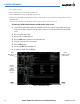
Figure 5-141 Selecting an Arrival
Available
Arrivals
Available
Transitions