
User Guide



GPS NAVIGATION
5-142 190-00494-00 Rev. B
Garmin G1000 Pilot’s Guide for the Cessna Citation Mustang
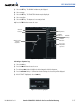
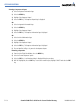
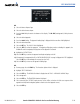
Load and/or activate an approach procedure:
1) Select the
PROC
Key.
2) Highlight ‘SELECT APPROACH’.
3) Select the
ENT
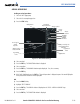
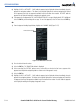
Key. A list of available approaches for the destination airport is displayed (Figure 5-135).
4) Turn either
FMS
Knob to highlight the desired approach. The WAAS channel and ID for the selected approach
procedure are displayed in the ‘APPROACH CHANNEL’ field (Figure 5-135).
5) Select the
ENT
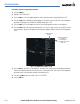
Key. A list of available transitions for the selected approach procedure is now displayed.
6) Turn either
FMS
Knob to selected the desired transition. The “Vectors” option assumes vectors will be received
to the final course segment of the approach and will provide navigation guidance relative to the final approach
course.
WAAS Approach ID:
W = WAAS;
10 = Runway 10;
A = 1st WAAS Approach to
Rwy 10
Figure 5-135 WAAS Channel Number and ID
WAAS Channel
Number
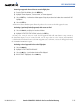
7) Select the
ENT
Key. ACTIVATE?’ is now displayed. Selecting ‘LOAD?’ will enter the selected approach procedure
into the active flight plan, but will not be currently active. Selecting ‘ACTIVATE?’ will enter the selected approach
procedure into the active flight plan and make it immediately active.
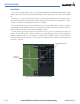
8) Turn the large
FMS
Knob to select either ‘LOAD?’ or ‘ACTIVATE?’.
9) Select the
ENT
Key.