
User Guide



GPS NAVIGATION
5-139190-00494-00 Rev. B
Garmin G1000 Pilot’s Guide for the Cessna Citation Mustang
ARRIVAL OPERATIONS
Loading an arrival procedure:
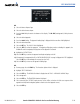
1) Select the ‘WPT’ page group.
2) Select the first rectangular page icon.
3) Press the
STAR
Softkey.
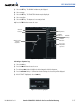
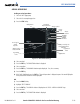
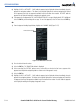
Figure 5-133 Arrival Information Page
Associated
Airport Identifier
Facility Name
Airport
Location
Available
Arrivals
Runways Served by the
Selected Arrival and
Transition
List of Legs in
Arrival
Sequence
Map Showing
Selected Arrival
Available
Transitions
Airport Symbol
Airport
Usage
Leg Starting
Point
Leg Desired
Track
Leg Distance
4) Select an arrival.
5) Press the
ENT
Key. The TRANSITION window is displayed.
6) Select a transition.
7) Press the
ENT
Key. The RUNWAY window may be displayed. If so, select a runway.
8) Press the
ENT
Key.
9) With ‘LOAD’ highlighted, press the
ENT
Key. The arrival procedure is displayed as part of the overall flight plan
and is placed at the end of the enroute flight plan.
OR:
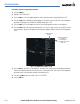
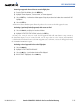
1) Press the PROC Softkey.
2) Highlight ‘SELECT ARRIVAL’.
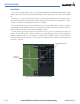
3) Press the ENT Key. The ARRIVAL window is displayed on the ‘PROC – ARRIVAL LOADING’ Page.
4) Select an arrival.
5) Press the ENT Key. The TRANSITION window is displayed.