
User Guide





GPS NAVIGATION
5-132 190-00494-00 Rev. B
Garmin G1000 Pilot’s Guide for the Cessna Citation Mustang
DELETE FLIGHT PLAN
The entire flight plan or selected waypoints within the flight plan may be deleted.
Deleting the entire flight plan:
1) From the Flight Plan Window, select the
MENU
Key.
2) Highlight ‘Delete Flight Plan’.
3) Select the
ENT
Key.
4) Select the
ENT
Key to delete all waypoints in the flight plan.
Deleting selected waypoints in the flight plan:
1) From the Flight Plan Window, select the desired waypoint.
2) Select the
CLR
Key. The ‘Remove Waypoint Name?’ Window is displayed with ‘OK’ highlighted.
3) Select the
ENT
Key.
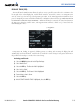
CLOSEST POINT OF FPL
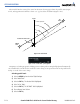
‘Closest Point of FPL’ calculates the bearing and closest distance at which a flight plan passes a reference
waypoint. It may also be used to create a new user waypoint along the flight plan at the location closest to a
chosen reference waypoint.
Determining the closest point along the active flight plan to a selected waypoint:
1) From the Flight Plan Window, select the MENU Key.
2) Highlight ‘Closest Point of FPL’.
3) Select the ENT Key. A window appears with the reference waypoint field highlighted.
4) Enter the identifier of the reference waypoint.
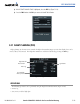
5) Select the ENT Key. The G1000 displays the bearing (BRG) and distance (DIS) to the closest point along the
flight plan from the selected reference waypoint.
6) To create a user waypoint at this location and add it to the flight plan, select the ENT Key. The name for the
new user waypoint is derived from the identifier or the reference waypoint.