
User Guide





GPS NAVIGATION
5-130 190-00494-00 Rev. B
Garmin G1000 Pilot’s Guide for the Cessna Citation Mustang
• Load or remove departure, arrival, or approach
• Closest Point of FPL
• Restore defaults
• Parallel track
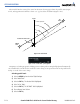
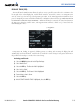
Figure 5-126 Flight Plan Page Menu
CREATE NEW FLIGHT PLAN
Up to 99 flight plans with up to 99 waypoints in each flight plan can be created and stored in memory.
Creating a new flight plan:
1) Select the
FPL
Key.
2) Press the
FMS
Knob to activate the cursor. The waypoint field is highlighted.
3) Enter the identifier, city/state, or facility name of the airport/waypoint.
4) Select the
ENT
Key. The cursor flashes on the next empty waypoint field.
5) Enter the identifier for each additional waypoint.
6) Select the
FPL
Key to remove the window.
ACTIVATE LEG
‘Activate Leg’ selects the highlighted leg as the “active leg” (the flight plan leg which is currently used for
navigation guidance).
Activating a flight plan along a specific leg:
1) From the Flight Plan Window, press the FMS Knob to activate the cursor.
2) Highlight the desired destination waypoint.
3) Select the MENU Key.
4) Highlight ‘Activate Leg’.
5) Select the ENT Key. A confirmation window is displayed with ‘ACTIVATE’ highlighted.
6) Select the ENT Key.