
User Guide





GPS NAVIGATION
5-129190-00494-00 Rev. B
Garmin G1000 Pilot’s Guide for the Cessna Citation Mustang
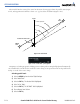
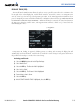
8) With ‘ACTIVATE PARALLEL TRACK’ highlighted, select the ENT Key (Figure 5-124).
9) Press the FMS Knob or the CLR Key to remove the Parallel Track Window.
Figure 5-124 Activate PT Option
5.21 FLIGHT PLANNING (PFD)
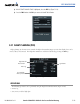
Flight planning on the PFD centers around the Flight Plan Window (Figure 5-125) where flight plans can be
created, edited, and activated. The Flight Plan Window is enabled and disabled by pressing the
FPL
Key.
Desired Track
Next Available
Memory Position
Figure 5-125 Flight Plan Window
Flight Plan Title
Leg Distance
Active Leg
OPERATIONS
The following operations can be performed using the Flight Plan Window Menu (Figure 5-126).
• Activate leg
• Store, invert, or delete flight plan