
User Guide





GPS NAVIGATION
5-128 190-00494-00 Rev. B
Garmin G1000 Pilot’s Guide for the Cessna Citation Mustang
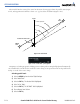
When Parallel Track is activated, the course line drawn on the map pages shows the parallel course (Figure
5-122), and waypoint names will have a lower case “p” placed after the identifier (Figure 5-123).
Figure 5-122 Parallel Track
TO
WPT
FROM
WPT
North
BRG
Parallel Track Distance
Course
DTK
TRK
Figure 5-123 Parallel Track “p” Designation
Using Direct-to, loading an approach, holding pattern, or editing and executing the flight plan will automatically
cancel Parallel Track. Parallel track is cancelled if a course change occurs greater than 120° or the parallel tracks
overlap as a result of the course change.
Activating parallel track:
1) Select the MENU Key from the Active Flight Plan Page.
2) Select ‘Parallel Track’.
3) Select the ENT Key. The direction field is highlighted.
4) Select ‘Left’ or ‘Right’.
5) Select the ENT Key. The ‘DISTANCE’ field is highlighted.
6) Enter a distance from 1-99 nm.
7) Select the ENT Key.