
User Guide




190-00494-00 Rev. B
Garmin G1000 Pilot’s Guide for the Cessna Citation Mustang
1-17
SYSTEM OVERVIEW
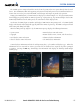
Figure 1-10 Reversionary Mode (Manual)
Reversionary mode is entered based upon automatic fault monitoring and detection internal switching. This
mode can also be activated manually by pressing the dedicated
DISPLAY BACKUP
button at the bottom of the
audio panel (see Figure 1-11 and refer to the Audio Panel section for further details). Pressing this button again
deactivates reversionary mode.
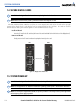
Figure 1-11 DISPLAY BACKUP Button
Pressi ng the D I S P L AY
BACKUP button activates/
deactivates reversionary
mode for both the on-side
PFD and the MFD.
Each display can be configured to operate in reversionary mode, as follows:
•
PFD1
– By pressing the
DISPLAY BACKUP
button on the left audio panel.
•
MFD
– By pressing the
DISPLAY BACKUP
button on the left or the right audio panel.
•
PFD2
– By pressing the
DISPLAY BACKUP
button on the right audio panel.
Should the connection between a PFD and the on-side GIA 63W become inoperative, the on-side GIA 63W
can no longer communicate with the remaining PFD (refer to Figure 1-
1). As a result, the NAV and COM
functions provided to the failed PFD by the on-side GIA 63W are flagged as invalid (red “X”) on the remaining
PFD (see Figure 1-12).
Figure 1-12 Inoperative Input (NAV1 Shown)
AHRS OPERATION
NOTE: Refer to the Appendices for specific AHRS alert information.
NOTE: Aggressive maneuvering in any of the three reversionary modes listed in Table 1-1 can degrade AHRS
accuracy.