
User Guide




GPS NAVIGATION
5-116 190-00494-00 Rev. B
Garmin G1000 Pilot’s Guide for the Cessna Citation Mustang
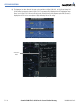
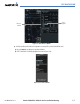
a) Press the VNV PROF Softkey to place the cursor in the target vertical speed field (VS TGT) as shown in Figure
5-103.
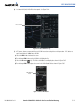
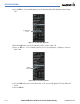
b) At this point, the desired descent vertical speed can be selected, or the desired FPA can be selected. Turn the
large FMS Knob to select the desired selection field, then turn the small FMS Knob to entered the desired
value.
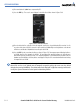
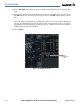
Note the information now displayed in the ‘CURRENT VNV PROFILE’ box. Also, note the offset waypoint and
gray circle are now displayed on the map. The gray circle marks the Top of Descent (TOD). In this example,
vertical guidance will be provided at the TOD that will result in a -3.0-degree FPA descent to an altitude of
10,000 feet upon reaching the offset waypoint.
c) Select the ENT Key.
Figure 5-103 Adjusting the Descent
Target
Vertical Speed
Field