
User Guide




GPS NAVIGATION
5-112 190-00494-00 Rev. B
Garmin G1000 Pilot’s Guide for the Cessna Citation Mustang
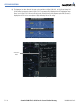
e) Enter an altitude of 10,000 feet as requested by ATC.
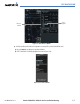
f) Press the ENT Key. The cursor is now displayed in the VNV offset field as shown in Figure 5-96.
Figure 5-96 Enter VNV Offset Distance
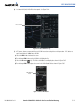
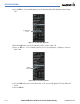
g) Enter the desired offset, or distance from the waypoint at which the selected altitude will be reached. In this
case, three miles prior to OPSHN is entered. In other words, the G1000 will give vertical guidance so the aircraft
will arrive at an altitude of 10,000 feet three miles prior to OPSHN.
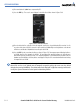
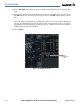
h) Press the ENT Key twice to activate the direct-to. Note, in Figure 5-97, the magenta arrow indicating the direct-
to OPSHN after the offset waypoint for OPSHN. The preceding offset waypoint indicates the offset distance
and altitude that was previously entered. The remaining waypoints in the loaded arrival procedure have no
database specified altitudes, therefore, dashes are displayed. Keep the CDI centered and maintain a track along
the magenta line to OPSHN.
NOTE: If the loaded arrival procedure has waypoints with altitude constraints retrieved from the database
that will be used as is, the altitude must be manually accepted by placing the cursor over the desired
altitude, then pressing the ENT Key. The altitude will now be displayed as light blue meaning it will now be
used by the system to determine vertical speed and deviation guidance.