
User Guide



GPS NAVIGATION
5-104 190-00494-00 Rev. B
Garmin G1000 Pilot’s Guide for the Cessna Citation Mustang
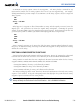
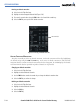
Entering an altitude constraint:
1) Select the Active Flight Plan Page.
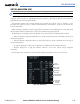
2) Highlight the desired waypoint altitude field (Figure 5-86).
3) Enter an alt constraint value using the FMS Knob or the Control Unit number keys.
4) Select the ENT Key to accept the VNV altitude constraint.
Figure 5-86 Entering an Altitude Constraint
VNV ALT Field
ALTITUDE CONSTRAINT MODIFICATION
The pilot can modify or delete any altitude constraint. An altitude constraint is deleted by highlighting
the altitude and pressing the CLR then ENT Key. In the event an altitude constraint is deleted and the
navigation database contains an altitude restriction for the lateral waypoint, the G1000 displays the altitude
restriction from the database provided no predicted altitude can be provided.
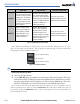
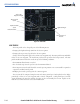
Changing an altitude constraint:
1. Select the Active Flight Plan Page.
2. Highlight the desired altitude constraint.
3. Use the FMS Knob or control unit number keys to change the altitude constraint value.
4. Select the ENT Key to confirm the change.
Deleting an altitude constraint:
1. Select the Active Flight Plan Page.
2. Highlight the desired altitude constraint.
3. Select the CLR Key.
4. Select the ENT Key.