
User Guide



GPS NAVIGATION
5-97190-00494-00 Rev. B
Garmin G1000 Pilot’s Guide for the Cessna Citation Mustang
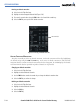
ACTIVE LEG DISPLAY WITH COLLAPSED AIRWAY ACTIVE
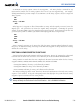
The Flight Plan Page always keeps the following three waypoints visible:
• From Waypoint
• To Waypoint
• Next Waypoint (shows the next course)
To prevent one or more of these waypoints from being hidden in a collapsed airway segment, the airway
segment that contains either the “To” or the “Next” waypoint will be automatically expanded.
INSERTING OPTIONAL AIRWAY WAYPOINTS
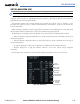
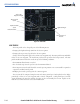
Occasionally, the pilot will need to be able to insert one of the “optional” airway waypoints into the flight
plan. To make this easy, they are provided on a list like FPL, NRST and RECENT. The list is called AIRWAY.
To add one of these to the flight plan, place the cursor over and left-click the FMS Knob, select the list which
will have the desired waypoint, select one and press the ENT Key to insert it into the flight plan.
Figure 5-83 Inserting Optional Airspace Waypoints