
User Guide


GPS NAVIGATION
5-96 190-00494-00 Rev. B
Garmin G1000 Pilot’s Guide for the Cessna Citation Mustang
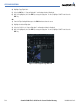
COLLAPSE AIRWAYS FEATURE
‘Collapse Airways’ is selectable from the Flight Plan Menu if the flight plan contains at least one airway and
the current state is “expanded” (Figure 5-82). In similar fashion, “Expand Airways” will be selectable if the
flight plan contains airways and the current state is “collapsed”. When airways have been collapsed, it will
be indicated on the airway heading.
Figure 5-82 Collapse Airway Feature
COLLAPSING AIRWAYS ON THE PFD FLIGHT PLAN WINDOW
On the PFD Flight Plan Window when the airway display has been collapsed, only the Entry and Exit
waypoints of the airway will be shown. When collapsed format is active, leg-to-leg computed values such as
DIS or ETE shown for the exit waypoint reflects the total of all the legs on the airway that have been hidden
in the collapsed display. The DTK value is inhibited because its meaning is not clear in this context.
The “Expanded” format will automatically be selected after the “Load Airway” function is used (facilitates
review of the flight plan).