
User Guide




190-00494-00 Rev. B
Garmin G1000 Pilot’s Guide for the Cessna Citation Mustang
1-14
SYSTEM OVERVIEW
1.4 SECURE DIGITAL CARDS
NOTE:
Refer to the Appendices for instructions on updating the aviation database.
NOTE:
Ensure that the G1000 system is powered off before inserting the SC card.
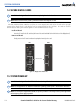
The GDU 1040A and GDU 1500 data card slots use Secure Digital (SD) cards and are located on the top right
portion of the display bezels. Each display bezel is equipped with two SD card slots. SD cards are used for
aviation database and system software updates as well as terrain database storage.
Install an SD card
Insert the SD card in the SD card slot (the front of the card should be flush with the face of the display bezel).
Remove an SD card
Gently press on the SD card to release the spring latch and eject the card.
Figure 1-6 Display Bezel SD Card Slots
PFD
MFD
SD Card Slots
1.5 SYSTEM POWER-UP
NOTE: Refer to the Appendices for AHRS initialization bank angle limitations.
NOTE: See the Appendices for additional information regarding system-specific annunciations and alerts.
NOTE: See the Airplane Flight Manual (AFM) for specific procedures concerning avionics power application
and emergency power supply operation.