
User Guide


GPS NAVIGATION
5-94 190-00494-00 Rev. B
Garmin G1000 Pilot’s Guide for the Cessna Citation Mustang
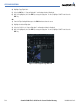
Exit Waypoint
List
Figure 5-79 Exit Waypoint List
3) Select the desired EXIT waypoint and press the ENT Key. With the cursor over the LOAD prompt press the ENT
Key and now the selected airway segment is loaded into the flight plan. The system returns to the Flight Plan
Page with the cursor position placed on the line just after the exit waypoint of the airway segment.
REMOVING BYPASSED WAYPOINTS FROM THE FLIGHT PLAN
The rules for removing bypassed waypoints in the original flight plan are as follows:
1. Waypoints within an arrival or approach procedure are not removed during the load airway operation. Note
that the pilot can always remove individual waypoints if necessary.
2. If there is a sequence of waypoints in the original flight plan starting with the entry waypoint that lines up with
a sequence of waypoints in the new airway segment, that sequence is removed from the original flight plan (so
it does not get duplicated). This rule applies only to the departure and enroute/airway parts of the flight plan
(not the arrival or the approach).
3. If the airway was inserted at a departure waypoint, all the waypoints in the departure procedure following the
insertion point will be removed (when the pilot joins an airway from a departure waypoint, he is not intending
to come back to the departure).
4. If the airway was inserted at an existing airway waypoint, the remaining waypoints in the airway will be
removed.
If there is not enough room in the flight plan to insert the airway segment, a pop-up message is displayed:
‘Flight Plan is full. Remove unnecessary waypoints.’ When this happens, the flight plan will not be changed.
Determination of “flight plan full” will account for the number of waypoints to be added with the new airway
segment as well as the number of bypassed waypoints that would be removed from the original flight plan.