
User Guide





GPS NAVIGATION
5-82 190-00494-00 Rev. B
Garmin G1000 Pilot’s Guide for the Cessna Citation Mustang
6) Enter the identifier for each additional flight plan waypoint.
7) Once all waypoints have been entered, press the FMS Knob to store the flight plan and return to the Flight Plan
Catalog Window.
Viewing flight plan information:
1) Select the Flight Plan Catalog Page.
2) Highlight the desired flight plan from the list.
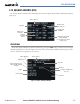
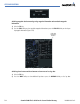
3) The Flight Plan Information is displayed showing departure, destination, total distance, and enroute safe altitude
information for the selected Flight Plan (Figure 5-68).
Figure 5-68 Flight Plan Information
Direct-To Waypoint
Identifier, Facility,
Symbol, City
Total Flight Plan Distance
Destination Waypoint
Departure Waypoint
Enroute Safe Altitude