
User Guide





GPS NAVIGATION
5-81190-00494-00 Rev. B
Garmin G1000 Pilot’s Guide for the Cessna Citation Mustang
5.20 FLIGHT PLANNING (MFD)
FLIGHT PLANNING OPERATIONS
Creating a new flight plan:
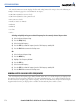
1) From the Flight Plan Catalog Page, press the NEW Softkey. The Stored Flight Plan Page is displayed with a blank
field for the first empty storage location.
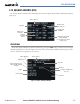
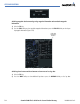
2) Enter the identifier, facility, or city name of the departure waypoint (Figure 5-67).
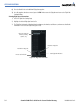
Stored Flight Plan
Page
Figure 5-67 Creating a Flight Plan
Entering an
Identifier
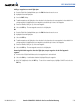
3) Select the ENT Key.
4) Enter the identifier for each additional flight plan waypoint.
5) Once all waypoints have been entered, press the FMS Knob to store the flight plan and return to the Flight Plan
Catalog Window.
OR:
1) Select the FPL Key.
2) Turn the small FMS Knob to display the Flight Plan Catalog Window.
3) Select the MENU Key.
4) Highlight ‘Create New Flight Plan’.
5) Select the ENT Key. The Stored Flight Plan Page is displayed. A blank flight plan page is displayed for the first
empty storage location. Enter the identifier, facility, or city name of the departure waypoint and select the ENT
Key.