
User Guide




GPS NAVIGATION
5-56 190-00494-00 Rev. B
Garmin G1000 Pilot’s Guide for the Cessna Citation Mustang
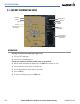
5.9 NDB INFORMATION (MFD)
OPERATIONS
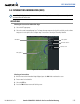
Selecting the NDB Information Page:
1) Select the WPT page group.
2) Select the third rectangular page icon.
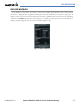
NDB Frequency
NDB Name
NDB Identifier
General Location
NDB Symbol
Nearest City
Nearest Airport;
identifier, symbol,
bearing, distance
NDB Symbol
Figure 5-50 NDB Information Page
Selecting a specific NDB:
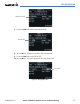
1) With the NDB Information Page displayed, press the
FMS
Knob to activate the cursor.
2) Highlight the desired selection field (identifier, name or closest city).
3) Enter an identifier, name or city.
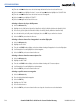
4) Select
the
ENT
Key.
5) Press the
FMS
Knob to remove the flashing cursor.
If duplicate identifiers occur, a Duplicate Waypoints Menu pops up, from which the desired waypoint can
be selected. When scrolling through the closest cites list to select an NDB, a city may appear more than once,
depending on the number of NDBs near it.