
User Guide





190-00494-00 Rev. B
Garmin G1000 Pilot’s Guide for the Cessna Citation Mustang
1-10
SYSTEM OVERVIEW
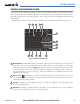
5
PROC Key
– Gives access to IFR departure procedures (DPs), arrival procedures (STARs) and approach
procedures (IAPs) for a flight plan. If a flight plan is used, available procedures for the departure and/or
arrival airport are automatically suggested. Theses procedures can then be loaded into the active flight
plan. If a flight plan is not used, both the desired airport and the desired procedure may be selected.
6
Joystick
– Changes the map range when rotated. Activates the map pointer when pressed.
7
Alphanumeric Keys
– Allow the user to enter data quickly, without having to select individual characters
with the
FMS
Knob.
8
Plus (+) Minus (-) Key
– Toggles a (+) or (-) character.
9
Decimal Key
– Enters a decimal point.
10
SEL Key
– The center of this key activates the selected softkey, while the right and left arrows move the
softkey selection box to the right and left, respectively.
11
ENT Key
– Validates or confirms a menu selection or data entry.
12
CLR
Key
– Erases information, cancels entries, or removes page menus. Pressing and holding this key
displays the Navigation Map Page automatically.
13
SPC Key
– Adds a space character.
14
BKSP Key
– Moves the cursor back one character space.
AFCS CONTROLS
NOTE: With the exception of the
FD
and
SPD
Keys, if a key is selected, its respective annunciator is
illuminated.
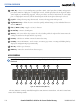
1 2 3 4 5 6 7 8
10 917 16 15 14 13 12 111819
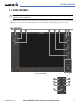
Figure 1-4 AFCS Control Unit (GMC 710)
The GFC 700 AFCS is mainly controlled through the GMC 710 AFCS Control Unit. The AFCS Control Unit
consists of the following controls: