
User Guide




GPS NAVIGATION
5-49190-00494-00 Rev. B
Garmin G1000 Pilot’s Guide for the Cessna Citation Mustang
Clearing vertical constraints:
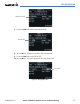
1) Select the MENU Key to display the Direct-to Menu.
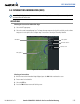
2) Select ‘Clear Vertical Constraints’ (Figure 5-44). Select the ENT Key.
Figure 5-44 Clear Vertical Constraints Menu Option
Cancelling a direct-to:
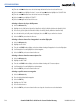
1) Select the MENU Key to display the Direct-to Menu.
2) Select the ENT Key to cancel direct-to navigation. If a flight plan is still active, the G1000 resumes navigating
the flight plan along the closest leg of flight.