
User Guide





GPS NAVIGATION
5-43190-00494-00 Rev. B
Garmin G1000 Pilot’s Guide for the Cessna Citation Mustang
DIRECT-TO NAVIGATION SHORTCUTS
A direct-to can be performed from any page displaying a single waypoint identifier (such as the waypoint
pages for airports and NAVAIDS) by simply pressing the Direct-to Key and the ENT Key. For pages that
display a list of waypoints (e.g., the Nearest Airport Page), the desired waypoint must be highlighted with the
cursor before pressing the Direct-to Key.
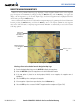
Direct-to destinations may also be selected from the Navigation Map Page by panning to the desired destination
location, pressing the Direct-to Key, and then the
ENT Key twice. If no airport, NAVAID or user waypoint
exists at the desired location, a temporary waypoint named ‘MAPWPT’ is automatically created at the location
of the map pointer.
Bearing and
Distance to
Map Waypoint
(MAPWPT)
Figure 5-36 Direct-to Navigation Using Map Panning
MAPWPT displayed
on the Navigation
Map
Direct-to Course
Line
Selecting a direct-to destination from the Navigation Map Page:
1) From the Navigation Map Page, press the JOYSTICK to display the map pointer.
2) Move the JOYSTICK to place the map pointer at the desired destination location.
3) If the map pointer is placed on an existing airport, NAVAID, or user waypoint, the waypoint name is
highlighted.
4) Select the ENT Key twice to navigate to the waypoint.
5) If the map pointer is placed on an open location, select the Direct-to Key.
6) Select the ENT Key twice to create a ‘MAPWPT’ waypoint and then navigate to it (Figure 5-36).