
User Guide





GPS NAVIGATION
5-42 190-00494-00 Rev. B
Garmin G1000 Pilot’s Guide for the Cessna Citation Mustang
Any waypoint contained in the flight plan can be selected as a direct-to destination from the Direct-to Waypoint
Window when navigating an active flight plan.
SPECIFYING A COURSE TO A WAYPOINT
When navigating a direct-to, the G1000 sets a direct great circle course to the selected destination. The course
to a destination can also be manually selected using the course field (‘COURSE’) on the Direct-to Waypoint
Window.
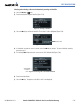
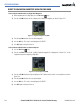
Figure 5-34 Entering a Direct-to Course
Manually selecting a direct-to course:
1) Select the Direct-to Key. The Direct-to Window is displayed with the destination field highlighted.
2) Highlight the course field.
3) Enter the desired course (Figure 5-34).
4) Select the ENT Key twice to begin navigation using the selected destination and course.
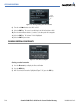
5) To reselect a direct course from the present position (or select a new manually defined course) select the
Direct-to Key. Select the ENT Key twice.
CANCELING DIRECT-TO NAVIGATION
Once a direct-to is activated, the G1000 provides navigation guidance to the selected destination until the
direct-to is either replaced with a new direct-to or flight plan, cancelled, or when the G1000 is powered off.
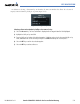
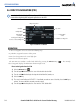
Figure 5-35 Cancel Direct-to Option
Cancelling a direct-to:
1) Select the Direct-to Key to display the Direct-to Window.
2) Select the MENU Key.
3) With ‘Cancel Direct-To NAV’ highlighted (Figure 5-35), select the ENT Key. If a flight plan is still active, the
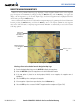
G1000 resumes navigating the flight plan along the closest leg.