
User Guide





GPS NAVIGATION
5-41190-00494-00 Rev. B
Garmin G1000 Pilot’s Guide for the Cessna Citation Mustang
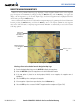
In addition to selecting a destination by an identifier, the Direct-to Window also allows the selection of
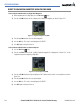
airports, VORs and NDBs by facility or city name (Figure 5-33).
Figure 5-33 Entering a Facility Name
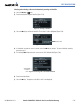
Selecting a direct-to destination by facility or the name of a city:
1) Select the
Direct-to
Key. The Direct-to Window is displayed with the waypoint identifier field highlighted.
2) Highlight the facility or city name field.
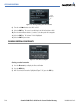
3) Enter the facility or city location of the desired waypoint. If duplicate entries exist for the entered facility or city
name, additional entries can be viewed by turning the small
FMS
Knob during the selection process.
4) Select the
ENT
Key to confirm the selected waypoint.
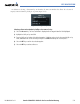
5) Select the
ENT
Key to activate a direct-to.