
User Guide




190-00494-00 Rev. B
Garmin G1000 Pilot’s Guide for the Cessna Citation Mustang
4-42
AUDIO PANEL AND CNS
NOTE: If the flight crew is using headsets that have a high/low switch or volume control knob, verify that
the switch is in the high position and the volume control on the headsets are at max volume setting. On
single-pilot flights, verify that all other headsets are not connected to avoid excess noise in the audio
system.
NOTE: Independent radio volume adjustments made using the PFD controls will affect only the audio output
for each radio selected for adjustment. Radio volume adjustment will affect both crew positions equally
for each radio that is adjusted. Turning the master volume control located on either audio panel will affect
only the audio heard in the corresponding crew position headset. Thus, radio volume adjustments may be
overridden by each crew position independently using the master volume control on the audio panel for the
respective crew position. The master volume control for each audio panel will affect all other system audio
output for the pilot or copilot headset.
Setting the Audio Panels during preflight:
1) Verify that the INTR COM Key is selected.
2) Verify that the MAN SQ Annunciator is extinguished.
3) Turn the MSTR Knob (Master Volume Control) on both Audio Panels clockwise two full turns. This will set the
headset audio level to max volume (least amount of attenuation).
4) Adjust radio volume levels (COM, NAV, etc.) to a suitable level.
5) Adjust the ICS volume Knob on each Audio Panel to the desired intercom level.
Once this procedure has been completed, the master volume controls on both Audio Panels may now be
adjusted. The flight crew can change settings, keeping in mind the notes above.
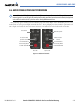
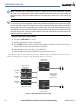
Figure 4-53 Radio and Headphone Volume Controls
Radio Volume
Knobs Adjust
Radio Level
Copilot Master
Volume Control
Pilot Master
Volume Control
Master Volume
Knobs Adjust
Headphone
Volume Level
COM Radio
Audio
NAV Radio
Audio
FMS
Knob Adjusts
ADF Volume Level
ADF Radio
Audio