
User Guide




190-00494-00 Rev. B
Garmin G1000 Pilot’s Guide for the Cessna Citation Mustang
4-38
AUDIO PANEL AND CNS
UNMUTED INPUTS
Stall, overspeed, and aural gear alerts are heard on the headset and speaker always, even when the speaker
is off.
All other alerts are always present on the headset and are on the speaker when the SPKR is selected. These
warnings and the aircraft radios are not heard on the passenger headphones.
INTERCOM
Pressing the INTR COM Key on either Audio Panel selects and deselects the intercom on both Audio Panels.
The annunciator is lit when the intercom is active. The intercom connects the pilot and copilot together. Either
the pilot or copilot may select or deselect the intercom.
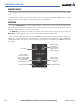
The MAN SQ Key allows either automatic or manual control of the intercom squelch setting. Pressing the
MAN SQ Key enables manual squelch control, indicated by the MAN SQ annunciator.
During manual squelch operation, pressing the
ICS Knob toggles between volume and squelch adjustment,
lighting the associated annunciator beneath the knob. When the MAN SQ annunciator is lit, the ICS Knob
controls both volume and squelch. When the MAN SQ annunciator is extinguished, the ICS Knob controls
only volume.
Manual Squelch
Annunciator; Off
for Automatic
Squelch, On for
Manual Squelch
Press to switch
between VOL and SQ.
Turn to adjust Squelch
when SQ Annunciation
is lit, Volume when
VOL Annunciation is lit.
Volume Annunciation Squelch Annunciation
Master Volume
Control for Pilot
Side or Copilot
Side
ICS Isolation
Figure 4-49 Intercom Controls