
User Guide




190-00494-00 Rev. B
Garmin G1000 Pilot’s Guide for the Cessna Citation Mustang
4-36
AUDIO PANEL AND CNS
FLIGHT ID REPORTING
The flight crew must enter the Flight ID before flight operation. The number is entered in the Timer/
References Window on the PFD. The Flight ID is not to exceed seven characters. No space is needed when
entering Flight ID. When a Flight ID contains a space, the system automatically removes it upon completion of
Flight ID entry. If configuration is set to “SAME AS TAIL” the aircraft tail number will always be displayed.
Entering a Flight ID:
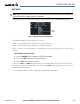
1) Select the TMR/REF Softkey to display the Timer/References Window.
2) Press the FMS Knob to activate the selection cursor, if not already activated.
3) Turn the large FMS Knob to scroll down to the Flight ID.
4) Turn the small FMS Knob to enter the desired Flight ID.
5) Press the ENT Key to complete Flight ID entry.
If an error is made during Flight ID entry, pressing the
CLR Key moves the cursor back one space for each
press of the key. If an incorrect Flight ID is discovered after the unit begins operation, reenter the correct Flight
ID using the same procedure.
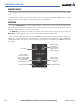
Figure 4-47 Timer/References Window, Entering FLT ID
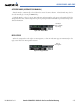
Flight ID
PFD Entry