
Pilot's Guide





Garmin G1000H
™
Pilot’s Guide for the Bell 407GX
190-01255-00 Rev B72
FLIGHT INSTRUMENTS
2.3 PFD ANNUNCIATIONS AND ALERTING FUNCTIONS
ThefollowingannunciationsandalertingfunctionsaredisplayedonthePFD.RefertotheEngineIndication
andCrewAlertingSystem(EICAS)SectionforinformationontheCrewAlertingSystem(CAS)andtoAppendix
Aformoreinformationonalertsandannunciations.
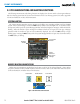
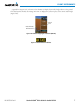
SYSTEM ALERTING
TheSystemMessagesWindowconveysmessagestotheightcrewregardingproblemswiththeG1000H
System.Whenanewmessageisissued,theMSGSoftkeyashestoalerttheightcrew.Itcontinuestoash
untilpressed,whichopenstheSystemMessagesWindowandacknowledgesthemessage(s)whichinitiatedthe
ashing.When the window is open, messages for conditions which are no longer active turn gray. Messages
generated while the window is open are not automatically displayed, but cause the MSG Softkeytobegin
flashing again. Pressing the MSGSoftkeywhiletheSystemMessagesWindowisopenclosesthewindowunless
the MSGSoftkeyisashing.
Annunciation
Window
Softkey
Flashes for
New System
Message
Messages
Window
Figure 2-37 Alerting System
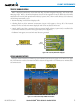
MARKER BEACON ANNUNCIATIONS
MarkerBeaconAnnunciationsaredisplayedonthePFDtotheleftoftheSelectedAltitude.Outermarker
receptionisindicatedinblue,middleinyellow,andinnerinwhite.RefertotheAudioPanelandCNSSection
formoreinformationonMarkerBeaconAnnunciations.
Figure 2-38 Marker Beacon Annunciations
Inner Marker
Middle MarkerOuter Marker
Altimeter