
Pilot's Guide






Garmin G1000H
™
Pilot’s Guide for the Bell 407GX
190-01255-00 Rev. B436
ADDITIONAL FEATURES
8.6 SATELLITE TELEPHONE AND DATA LINK SERVICES
NOTE
: Separate accounts must be established to access the Iridium satellite network for voice and Garmin
Flight Data Services for data transmission of maintenance reports.
The optional GDL 59H Data Link provides an aircraftsystemsdata logger for communication of potential
maintenanceissuesand,whiletheaircraftisontheground,ahighspeed(IEEE802.11g)Wi-Fidatalinkbetween
theaircraftandagroundcomputer network.TheGDL59Hcanalso bepairedwith andoptionalGSR56H
IridiumTransceiverprovidinganairbornelowspeeddatalink,IridiumSatelliteTelephoneserviceandSMStext
messaging. IridiumtelephoneandtextmessagingareavailabletotheightcrewthroughtheMulti-function
Display,audiopanelandheadset.
Operation of these features in the cockpit is accomplished through the AUX-TELEPHONE, AUX-TEXT
MESSAGING,AUX-REPORTSTATUS,andAUX-WI-FISETUPPages.
REGISTERING WITH GARMIN FLIGHT DATA SERVICES
Asubscriberaccount must beestablishedwith IridiumCommunications,Inc. prior tousingthe Iridium
SatelliteSystemfortelephone,text messaging and lowspeeddataservices.ContactGarminFlightDataServices
at1-866-739-5687intheUnitedStatesor913-397-8200,ext.1135establishanaccountfordatalinkservices.
Afteranaccounthasbeenestablished,thesystemmustberegisteredforuseofthedatalinkservices.
Registering the system for data link services:
1) With the system connected to a Wi-Fi network, turn the large FMS Knob on the MFD to select the AUX page
group.
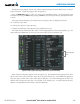
2) Turn the small FMS Knob to select SYSTEM STATUS. The AUX-SYSTEM STATUS Page is displayed. Note the
System ID number in the AIRFRAME field as seen in Figure 8-72. This number will be needed when contacting
Garmin Flight Data Services to establish the account.
3) Turn the small FMS Knob to select REPORTS/DATA LINK.
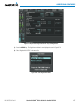
4) If necessary, select the REPORTS Softkey. The AUX-REPORT STATUS Page is now displayed as shown in Figure
8-73.