
Pilot's Guide




190-01255-00 Rev. B
Garmin G1000H
™
Pilot’s Guide for the Bell 407GX
315
HAZARD AVOIDANCE
6.2 GFDS WORLDWIDE WEATHER
NOTE: Garmin Flight Data Services Worldwide Weather provides information for avoiding hazardous
weather. Do not utilize Worldwide Weather information to penetrate hazardous weather.
NOTE: The availability of specific GFDS weather products varies by region and is subject to change. For
GFDS weather product coverage information, refer to fly.garmin.com/fly-garmin/gfds-weather. This Pilot’s
Guide shows all GFDS weather products, regardless of product availability in a specific area.
GarminFlightDataServices(GFDS)providesWorldwideWeatherreceptioncapabilitiestotheG1000Hthrough
theoptionalGSR56HIridiumsatellitedatalink.Graphicalweatherinformationandassociatedtextaredisplayed
ontheMultiFunctionDisplay(MFD)andthePrimaryFlightDisplay(PFD)InsetMap.
Weather data are providedafter the pilot initiates either a manual or automatic GFDS data requestonthe
WeatherDataLink(GFDS)PageontheMFD.
Worldwide Weather requires an active GFDS subscription. Refer to the Additional Features section for
informationonregisteringwithGFDSpriortoaccessingWorldwideWeatherproducts.
ACCESSING GFDS WORLDWIDE WEATHER PRODUCTS
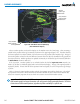
TheprimarymapforviewingGFDSWeatherdataistheWeatherDataLink(GFDS)PageintheMapPage
Group(Figure6-45). Thisisthe onlymapdisplay capableofshowing information forallavailable GFDS
Worldwide Weather products. No weather data isdisplayeduntilthe rst GFDS Weather Data Request is
made.
Viewing the Weather Data Link (GFDS) Page:
1) Turn the large
FMS
Knob to select the Map Page Group.
2) Turn the small
FMS
Knob
to select the Weather Data Link (GFDS) Page.