
Cockpit Reference Guide

Garmin G1000H
™
Cockpit Reference Guide for the Bell 407GX
190-01254-00 Rev. B
71
Hazard Avoidance
Flight
Instruments EICAS
Nav/Com/
XPDR/Audio AFCS GPS Nav
Flight
Planning Procedures
Hazard
Avoidance
Additional
Features
Abnormal
Operation
Annun/
Alerts Appendix Index
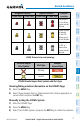
Unlighted Obstacle Lighted Obstacle
Obstacle
Location
< 1000’ AGL > 1000’ AGL < 1000’ AGL > 1000’ AGL
Red obstacle
is at or above
current aircraft
altitude
Yellow obstacle
is between
0’ and 250’
below current
aircraft altitud
e
Gray obstacle
is 250’ or
more below
current aircraft
altitude
HTAWS Obstacle Colors and Symbology
Potential Impact
Point Symbol
Alert Type
Example
Annunciation
Warning
Caution
HTAWS Potential Impact Point Symbols with Alert Types
Showing/hiding aviation information on the HTAWS Page:
1)
Press the MENU Key.
2)
Select ‘Show Aviation Data’ or ‘Hide Aviation Data’ (choice dependent on
current state) and press the ENT Key.
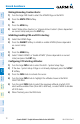
Manually testing the HTAWS System:
1)
Select the HTAWS Page.
2)
Press the MENU Key.
3)
Select ‘Test HTAWS System’ and press the ENT Key to confirm the selection.